![Picture1-1.png]](https://faqs.safetynetsolutions.co.uk/hs-fs/hubfs/Picture1-1.png?width=36&height=18&name=Picture1-1.png)
The implementation involves 2 main elements:
- How the Pre-booking dates are set up
- How the Visitor type expiries are configured.
PRE-BOOKING
Users must ensure that, during pre-booking, the visit end date is NOT amended to the date of the final visit when a recurrence is in place.
Only the RECURRENCE -> UNTIL *DATE* should be changed. The visit end date itself must be left set as a single day visit. The recurrence feature will automatically update the end date in line with the individual dates the recurring visits take place. Example below:
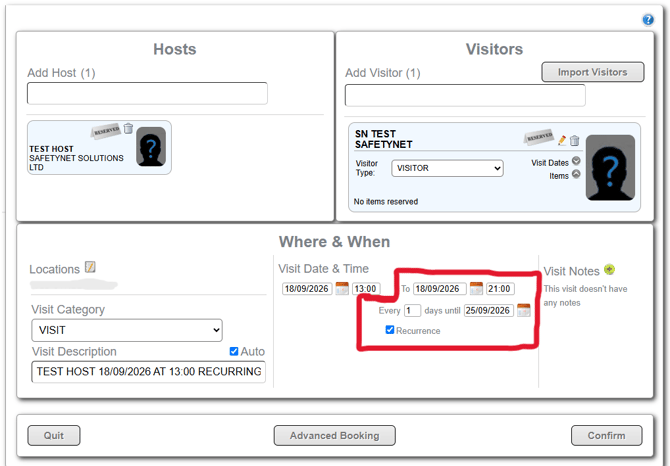
The above configuration will display individual pass expiries for: 18/09, 19/09, 20/09, etc. through to the final end date.
VISITOR TYPE CONFIGURATION
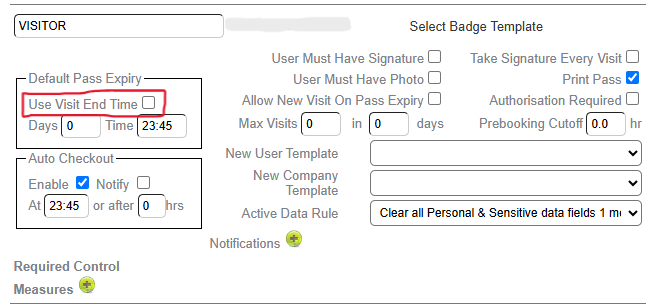
For each visitor type, the Default Pass Expiry settings need to be amended to allow the expiry to represent each individual day of a recurring visit.
'Use Visit End Time' option must be UNTICKED. Unticking this option allows the individual dates to be used as their expiry.
if left TICKED, the visits will instead display the recurrence end date across all visit passes. For this pre-booking, 25/09 would display on the passes for all visits.
In the below example, as the expiry is set to 23:45, the recurring visits will end each day at the set time.
This can be tested once completed by creating a recurring visit.
If configured correctly, it should display the expiry as the current day, and visits checked-in on the following days will show updated expiries for each corresponding day.