![Picture1-1.png]](https://faqs.safetynetsolutions.co.uk/hs-fs/hubfs/Picture1-1.png?width=36&height=18&name=Picture1-1.png)
SKYVISITOR™ & SAFEWORKS® from SAFETYNET SOLUTIONS LTD®
DESCRIPTION OF SERVICE
SKYVISITOR is a web based Visitor, Contractor and Resource Management System with Access & Compliance Control modules. SAFEWORKS is the Contractor Management module.
Installation & Privileges
SKYVISITOR.CLOUD runs as a website application. If connecting to peripheral devices (QR Scanner, camera, Printer) the Safetynet Team will carry out both the current and future installations, or assist client ICT Teams - depending on your preference.
The software does not require admin privileges to operate, but admin privileges may be required during set up to install peripheral hardware and allow access to hardware from the web site.
Software Maintenance
We will regularly update the software to ensure ongoing compliance with cyber security standards.
HOSTING
skyvisitor.cloud is where our new tech is deployed and is hosted entirely in Azure, managed by Aptivy Ltd our Cloud Managed Service Partner.
Outbound Whitelist (Customer)
- Allow access to the required services for your region(s) (UK or EU) as per the table below:
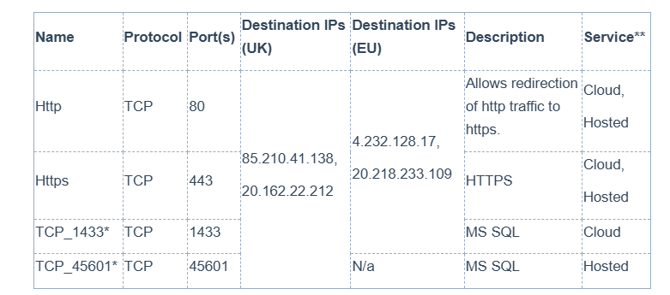
*SSL inspection must be disabled for TCP ports 1433 and 46501.
**If you are connecting on skyvisitor.com “Hosted” service, you should configure rules for both hosted and cloud services. This ensures your organisation is ready for migration.
If you are reading this as a new user, you will be using the “skyvisitor.cloud” service and you do not need to configure rules for hosted service types.
For new skyvisitor.cloud users who are using the installed Window Apps (commonly referred to as SKYVISITOR Booker and SKYTOUCH) you will need to provide your IPS for us to whitelist, so that we can further secure connections to your database.
- Cloud Whitelist - For Windows Apps Users only.
Provide your Static IP/ Site Information to Safetynet
Any IP address that could be used for web access should be provided.
This should include failover IP addresses, NAT/SNAT addresses. It is helpful to also provide a site name for each IP address to allow for easier management.
- Safetynet configures your whitelisted IP addresses
-
ENABLING THE LOCAL APPLICATIONS VIA THE CLOUD CONNECTION:
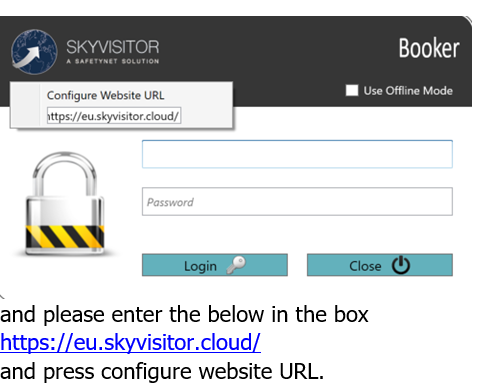
In order to use the applications via the Azure Cloud connection you will need to re configure the applications as per the below1) Please right click on the SKYTOUCH/ BOOKER log in page to get the URL configuration box
- Validate connectivity:
Connectivity can be tested using Windows PowerShell and the below commands.
UK South:
Test-NetConnection uks-01.skyvisitor.cloud http
Test-NetConnection uks-01.skyvisitor.cloud -port 443
Test-NetConnection uks-01.skyvisitor.cloud -port 1433
Test-NetConnection uks-01.skyvisitor.cloud -port 45601
UK West:
Test-NetConnection ukw-01.skyvisitor.cloud http
Test-NetConnection ukw-01.skyvisitor.cloud -port 443
Test-NetConnection ukw-01.skyvisitor.cloud -port 1433
Test-NetConnection ukw-01.skyvisitor.cloud -port 45601
Germany West:
Test-NetConnection dew-01.skyvisitor.cloud http
Test-NetConnection dew-01.skyvisitor.cloud -port 443
Test-NetConnection dew-01.skyvisitor.cloud -port 1433
Italy North:
Test-NetConnection itn-01.skyvisitor.cloud http
Test-NetConnection itn-01.skyvisitor.cloud -port 443
Test-NetConnection itn-01.skyvisitor.cloud -port 1433
DATA LOCATION:
Azure UK South, Azure UK West for UK data clients.
Region specific hosted for EMEA, US, APAC
MALWARE / PROTECTION
The service is protected from malware attacks.
File upload is only supported within a customer's environment.
Our servers and real estate are protected from viruses and malware.
Regular backups of data are taken supporting point in time restore.
DATA:
All customer databases are encrypted at rest with Transparent Data Encryption and a platform-managed key. We do not support customer-managed keys at this time. Data in transit from Azure is also encrypted
Azure VMs – Virtual Machines are used for hosting some legacy web services. These are accessed via traversing the Firewall and Application Gateway.
MAIN TECH STACK: NuxtJS 3, FeathersJS 5 and MSSQL (Azure)
Main Azure services/configuration:
-
Traffic Manager – DNS failover for disaster recovery.
-
Firewall – Inbound/outbound connections traverse a firewall in the hub virtual network.
-
Application Gateway – All web-based services traverse an application gateway.
-
AKS – Kubernetes clusters are used for hosting OCI compliant images. Cluster traffic ingresses/egresses via regional firewalls.
-
Azure Load Balancer – Used for AKS
-
Azure SQL - Azure SQL with Failover (and replication) Group between regions, native Microsoft backup/restore. Transparent data encryption. Connections require encryption with TLS v1.2 or greater.
-
Azure VMs – Virtual Machines are used for hosting some legacy web services. These are accessed via traversing the Firewall and Application Gateway.
AUTHENTICATION
The recommended method is that Users are authenticated via SSO.
We use the App LogTo - which supports open standards OIDC, OAuth 2.0 and SAML for authentication and authorisation - including Entra and OKTA.
LogTo KBA Link
SKYVISITOR.CLOUD can still support local username / password access if required.