![Picture1-1.png]](https://faqs.safetynetsolutions.co.uk/hs-fs/hubfs/Picture1-1.png?width=36&height=18&name=Picture1-1.png)
When creating a new database for a client who will be utilising SSO its important to alter the user permission groups to prevent them altering login details for themselves and other users. The following Permission groups need to be renamed and/or altered:
System Admin changed to SAFETYNET USE ONLY
Administrator changed to *Site name* ADMIN
The formally named ADMINISTRATOR permission groups is to have the following highlighted permissions unticked:
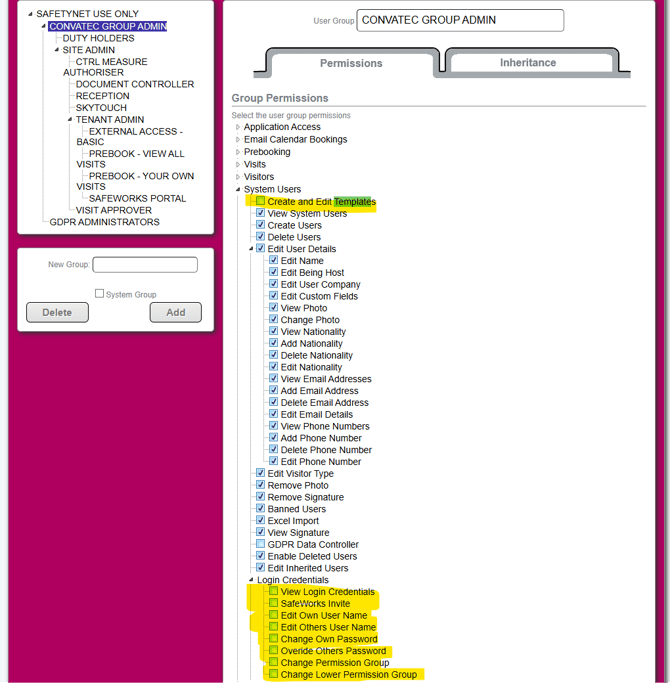
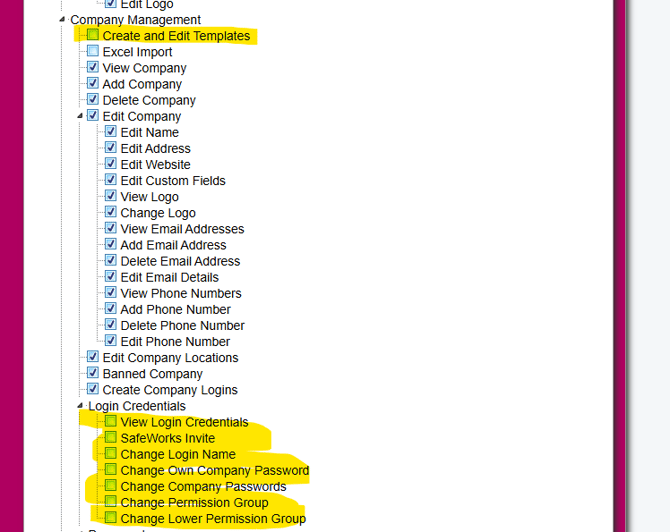
Once done, ensure that all permission groups beneath have the same applied.
For the SSO User templates the client needs to be asked the following to ensure that when users are pulled through they are given the correct locations and permissions:
1. Will there be users who will only ever have access to ONE specific location or a certain group of locations? (If so location specific SSO template must be created.)
2. If yes, what are the unique identifiers in there active directory/Entra that allow us to differentiate and then map to the correct SSO templates when pulled through.