![Picture1-1.png]](https://faqs.safetynetsolutions.co.uk/hs-fs/hubfs/Picture1-1.png?width=36&height=18&name=Picture1-1.png)
You will need to belong to a Permission Group which has Admin rights over the appropriate settings.
Logon to skyvisitor.com or skyvisitor.cloud (whichever is your hosted platform),or to the equivalent url if self-hosted.
Go to System Admin: 
Locations: 
then select the 'Notifications' tab &click the Green Plus sign to open the SMTP Settings
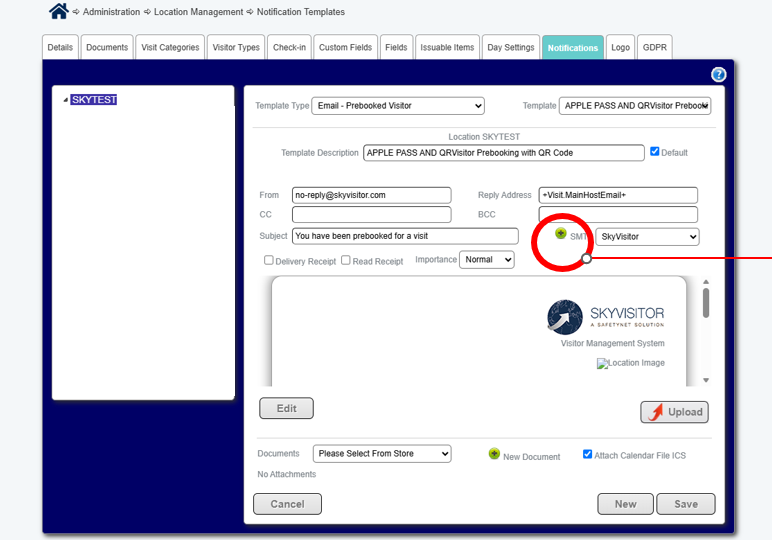
Create New, and enter your smtp settings as indicated: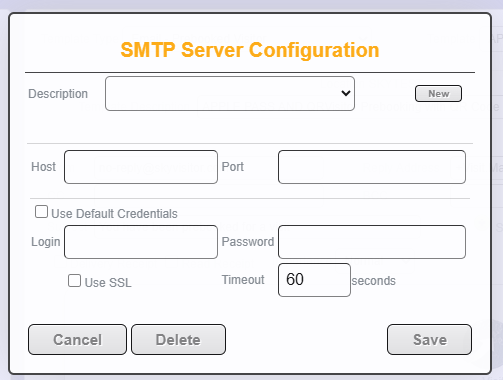
When complete, click Save, and ensure the preferred selection is showing as active (in place of the SkyVisitor one)
Click Save again, and you should be sending notifications via your own smtp.
If you have any issues please readc out to helpdesk@safetynetsolutions.co.uk