![Picture1-1.png]](https://faqs.safetynetsolutions.co.uk/hs-fs/hubfs/Picture1-1.png?width=36&height=18&name=Picture1-1.png)
Double check your active rules - eg.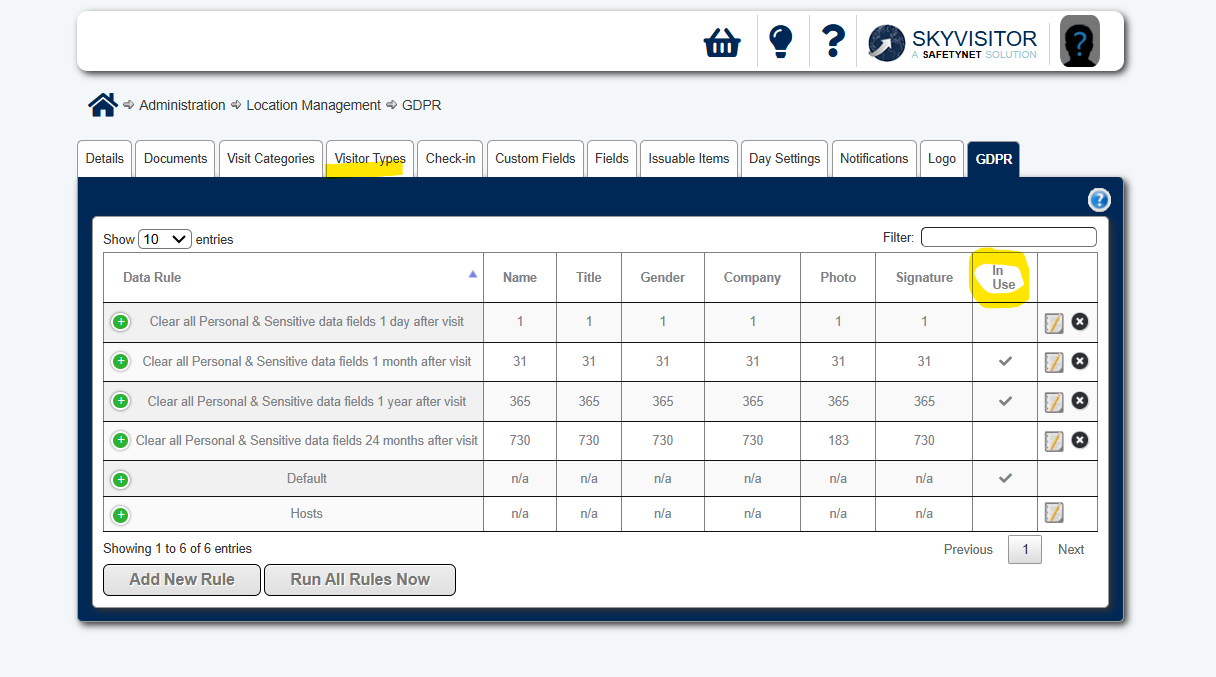 If your rules look correct, but you are still seeing data you believe should be redacted, there are 2 main reasons:
1. Deactivated Visitor Types
The GDPR redaction rules run off Visit User Type (not Default User Type).
If you (or your admin) have deactivated a Visitor Type it will also deactivate any rule set against it.
How do you resolve?
Email Helpdesk to ask the team to open a Deactivated User Type investigation. We will be able to confirm this and run rules on your data to remove the affected users.
Please note that there will be a future update released to include deactivated visitor types in the GDPR query. This article will be updated accordingly.
2. Is Host
The Users may have the correct Visitor Type according to the GDPR rule, but if they are ticked as Host on their profile and if you do not have a GDPR rule set for Hosts they will not be redacted.
The Host setting over-rides the Visitor Type.
How do you resolve?
Set a GDPR rule for Hosts.
The facility for GDPR management is very granular in SKYVISITOR.
If you are not familiar with this, you may find this article helpful.
You can always contact the Team to assist by email or call on 01270 508 565.
We are always happy to help.