![Picture1-1.png]](https://faqs.safetynetsolutions.co.uk/hs-fs/hubfs/Picture1-1.png?height=18&name=Picture1-1.png)
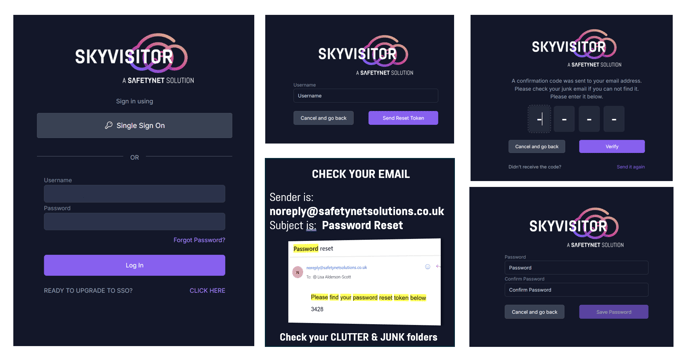
To reset a password for a 'local user account'
- Go to the login screen (skyvisitor.cloud) and click Forgot Password
-
Enter your username - please include your database identifier e.g. YOURBUILDINGID .YOUREMAIL
- Click Send Reset Code
- Check your email for code (Check Clutter and Junk folders and Mark as Trusted)
- Enter Code
- Choose new password
- Login
FAQs - Which email address will this be sent to?
The token will be sent to the MAIN mail account on your user profile. - What if I don't have access to that email address?
Contact your System Administrator who can change the email address for you.
You may contact Safetynet Solutions Helpdesk who will liaise with your System Admin for reset approval. Safetynet cannot reset your password without written permission from your nominated system admin. - Why can't an administrator create a new password for me?
Basically - Enhanced Cyber Security. It is safer to email a "forgot password" code to a user's verified email address than to allow another user or administrator to reset it for them due to several critical security principles:
-
Possession Factor Authentication (Something You Have):
-
When a "forgot password" code is sent to an email, the security relies on the user possessing access to that email account. This is a strong form of authentication because, presumably, only the legitimate user has control over their registered email address.
-
If another user or admin resets the password, there's no guarantee that the legitimate user is aware of or has authorised this change.
-
-
Prevention of Unauthorised Access by Insiders:
-
Allowing an administrator to reset a password creates a significant risk of insider threat. A malicious or compromised administrator could reset a user's password and gain unauthorized access to their account without the user's knowledge. This bypasses any security measures the user has in place (like strong passwords, 2FA on their account).
-
Even well-meaning administrators could accidentally reset the wrong account, leading to an inconvenience or, in a worse case, a security incident if the temporary password is mishandled.
-
-
Auditing and Accountability:
-
Sending a "forgot password" code directly to the user's email creates a clear audit trail. The system logs that a password reset request was initiated for that specific email address.
-
If an administrator resets a password, it can be harder to track who authorized the reset and why, especially if the process isn't meticulously logged.
-
-
Minimising Attack Surface:
-
Centralising password resets through a user's email reduces the "attack surface." Instead of having multiple individuals (administrators) with the power to change passwords, the system relies on the user's secure control over their email.
-
Compromising an email account is still a risk, but it's often more difficult than compromising an internal admin's credentials or exploiting an internal password reset tool.
-
-
User Empowerment and Control:
-
It gives the user direct control over their account security. They are the ones initiating the reset and receiving the code, ensuring they are aware of and approve the change.
-
It prevents scenarios where a user's account might be locked or changed without their consent.
-
-
Compliance and Best Practices:
-
Most security frameworks (like NIST, ISO 27001, GDPR) recommend or mandate self-service password resets verified through secure channels (like email or SMS) rather than relying on manual intervention by administrators for routine password resets. This is a widely accepted security best practice.
-
When Admin Resets Might Be Useful (and their risks):
While generally discouraged for routine resets, there are very specific, high-security scenarios where an admin might initiate a "force password reset" (e.g., if an account is suspected of compromise and needs immediate lockout).
In the case of SKYVISITOR.CLOUD this can be achieved by adding a Banned Status to the user, on their user profile.
In summary, direct email verification for "forgot password" requests leverages principles of least privilege, reduces insider threat potential, and empowers users while providing a more secure and auditable process.