![Picture1-1.png]](https://faqs.safetynetsolutions.co.uk/hs-fs/hubfs/Picture1-1.png?width=36&height=18&name=Picture1-1.png)
To exit/ close the SkyTouch Windows application, the following steps need to be followed:
1. From welcome screen of the application, tap the screen to proceed to the next screen
2. On the follow up screen, tap in the highlighted areas to reveal the SkyTouch interface:
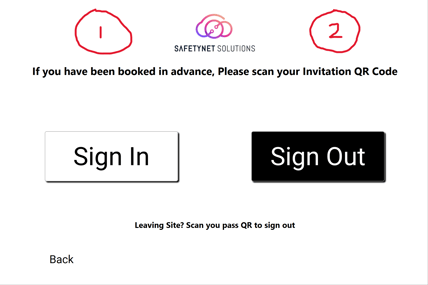
3. When presented with the interface options, select the 'Exit SkyTouch' option. If you wish to login to a different account, then select the 'Sign out' option instead.
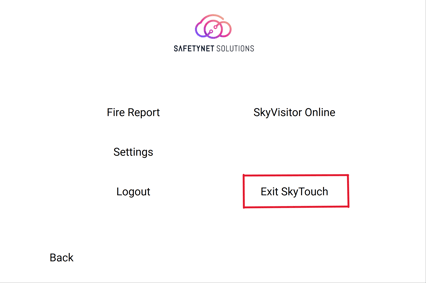
The SkyTouch application will now close for you to access the desktop. If you wish to re-open the application, simply select the following Icon or enter SkyTouch into you Windows search bar.