![Picture1-1.png]](https://faqs.safetynetsolutions.co.uk/hs-fs/hubfs/Picture1-1.png?width=36&height=18&name=Picture1-1.png)
This guide is segmented into the following sections:
Section 1 - Paper Jam Problems in the Cassette
Section 2 - Paper Jam Problems in the Rear Cover
Section 3 - Paper Feeding Problems in the Cassette
--------------------------------------------------------------------------------------------------------------------------
Section 1 - Paper Jam Problems in the Cassette
If paper has jammed in the cassette, follow the steps here to clear the jam.Note: Your product may look different than the one shown, but the steps are the same unless otherwise noted.
- Cancel the print job, if necessary.
- Pull out the paper cassette.
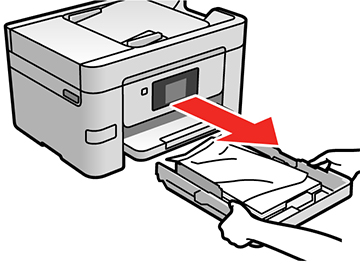
- Carefully remove any paper jammed inside the product.
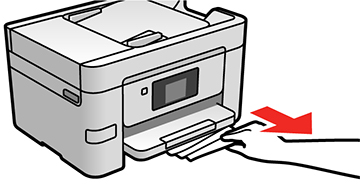
- Carefully follow all paper loading instructions and reload the paper.
- Keep the cassette flat as you gently insert it.
- Follow the prompts on the LCD screen to clear any error messages. If you still see a paper jam message, check the other paper jam solutions.
--------------------------------------------------------------------------------------------------------------------------
Section 2 - Paper Jam Problems in the Rear Cover
If paper has jammed in the rear cover, follow the steps here to clear the jam.
- Cancel the print job, if necessary.
- Squeeze the tabs and open the rear cover.

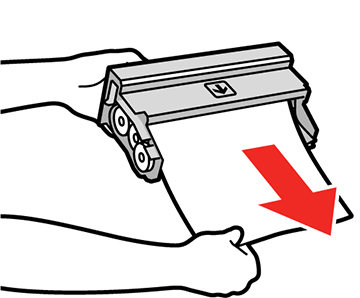
- Carefully remove any jammed paper from inside the product.

- Carefully remove any jammed paper from the duplexer.
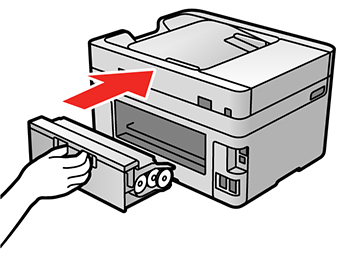
- Close the rear cover.
- Follow the prompts on the LCD screen to clear any error messages. If you still see a paper jam message, check the other paper jam solutions.
--------------------------------------------------------------------------------------------------------------------------
Section 3 - Paper Feeding Problems in the Cassette
If you have problems feeding paper, try these solutions:
- Make sure the paper cassette is inserted all the way in the printer.
- Make sure the paper size and type settings match the size and type of paper you loaded.
- If paper does not feed correctly, remove and reload it in the cassette and adjust the edge guides. Make sure the paper stack is not above the tab on the edge guides inside the cassette.
- If multiple pages feed at once, remove the paper, fan the edges to separate the sheets, and reload it.
- Do not load more than the recommended number of sheets.
- Make sure your paper meets the specifications for your product.
- If paper jams when you print on both sides of the paper, try loading fewer sheets.
- If too many pages are fed when you are performing manual 2-sided printing, remove all other paper from the cassette before reloading the paper.
- For best results, follow these guidelines: Note: Your product will not operate properly while tilted at an angle. Place it on a flat, stable surface that extends beyond the base of the product in all directions.