![Picture1-1.png]](https://faqs.safetynetsolutions.co.uk/hs-fs/hubfs/Picture1-1.png?width=36&height=18&name=Picture1-1.png)
Purpose
To limit access to information and information processing systems, networks, and facilities to authorized parties in accordance with business objectives.
Scope
All safetynetsolutions.co.uk information systems that process, store, or transmit confidential data as defined in the safetynetsolutions.co.uk Data Management Policy.
This policy applies to all employees of safetynetsolutions.co.uk and to all external parties with access to safetynetsolutions.co.uk networks and system resources.
General requirements
Access to information computing resources is limited to personnel with a business requirement for such access.
Access rights shall be granted or revoked in accordance with this Access Control Policy.
Business requirements of Access Control Policy
safetynetsolutions.co.uk shall determine the type and level of access granted to individual users based on the "principle of least privilege."
This principle states that users are only granted the level of access absolutely required to perform their job functions, and is dictated by safetynetsolutions.co.uk's business and security requirements.
Permissions and access rights not expressly granted shall be, by default, prohibited. safetynetsolutions.co.uk's primary method of assigning and maintaining consistent access controls and access rights shall be through the implementation of RoleBased Access Control (RBAC).
Wherever feasible, rights and restrictions shall be allocated to groups.
Individual user accounts may be granted additional permissions as needed with approval from the system owner or authorised party.
All privileged access to production infrastructure shall use Multi-Factor Authentication (MFA).
Access to networks and network services
The following security standards shall govern access to safetynetsolutions.co.uk networks and network services:
- Technical access to safetynetsolutions.co.uk networks must be formally documented including the standard role or approver, grantor, and date
- Only authorized safetynetsolutions.co.uk employees and third-parties working off a signed contract or statement of work, with a business need, shall be granted access to the safetynetsolutions.co.uk production networks and resources
- safetynetsolutions.co.uk guests may be granted access to guest networks after registering with office staff without a documented request
- Remote connections to production systems and networks must be encrypted
Customer access management
When configuring cross-account access using AWS IAM roles, you must use a value you generate for the external ID, instead of one provided by the customer, to ensure the integrity of the cross account role configuration.
A partner-generated external ID ensures that malicious parties cannot impersonate a customer's configuration and enforces uniqueness and format consistency across all customers.
The external IDs used must be unique across all customers.
Re-using external IDs for different customers does not solve the confused deputy problem and runs the risk of customer A being able to view data of customer B by using the role ARN of customer B along with the external ID of customer B.
Customers must not be able to set or influence external IDs. When the external ID is editable, it is possible for one customer to impersonate the configuration of another.
User access management
safetynetsolutions.co.uk requires that all personnel have a unique user identifier for system access, and that user credentials and passwords are not shared between multiple personnel.
Users with multiple levels of access (e.g. administrators) should be given separate accounts for normal system use and for administrative functions wherever feasible.
Root, service, and administrator accounts may use a password management system to share passwords for business continuity purposes only.
Administrators shall only use shared administrative accounts as needed.
If a password is compromised or suspected of compromise the incident should be escalated to the information security team / Directors immediately and the password must be changed.
User registration and de-registration
Only authorized administrators shall be permitted to create new user IDs, and may only do so upon receipt of a documented request from authorized parties.
User provisioning requests must include approval from data owners or safetynetsolutions.co.uk management authorized to grant system access.
Prior to account creation, administrators should verify that the account does not violate any safetynetsolutions.co.uk security or system access control policies such as segregation of duties, fraud prevention measures, or access rights restrictions.
User IDs shall be promptly disabled or removed when users leave the organization or contract work ends in accordance with SLAs. User IDs shall not be re-used.
User access provisioning
- New employees and/or contractors are not to be granted access to any safetynetsolutions.co.uk production systems until after they have completed all HR on-boarding tasks, which may include but is not limited to signed employment agreement, intellectual property agreement, and acknowledgement of safetynetsolutions.co.uk's information security policy
- Access should be restricted to only what is necessary to perform job duties
- No access may be granted earlier than official employee start date
- Access requests and rights modifications shall be documented in an access request ticket or email.
- No permissions shall be granted without approval from the system or data owner or management
- Records of all permission and privilege changes shall be maintained for no less than one year
Management of privileged access
safetynetsolutions.co.uk shall ensure that the allocation and use of privileged access rights are restricted and managed judiciously.
The objective is to ensure that only authorized users, software components, and services are granted privileged access rights.
safetynetsolutions.co.uk will ensure that access and privileges conform to the following standard:
- Identify and Validate Users: Identify users who require privileged access for each system and process.
- Allocate Privileged Rights: Provision access rights basing allocations on specific needs and competencies, and adhering strictly to the access control policy.
- Maintain Authorization Protocols: maintain records of all privileged access allocations.
- Enforce Strong Authentication: Require MFA for all privileged access.
- Prevent Generic Admin ID Usage: prevent the usage of generic administrative user IDs
- Ensure Logging and Auditing: Log all privileged logins and activity
- Adopt Time-Bound Access Protocols: Grant privileged access only for the necessary duration required to accomplish specific tasks and revoke once the task is completed.
- Uphold Distinct and Separate Identities: Preserve distinct identities for privileged access rights and ensure such identities are neither shared among multiple users nor used for routine, non-administrative tasks.
User access reviews
Administrators shall perform access rights reviews of user, administrator, and service accounts on a quarterly basis to verify that user access is limited to systems that are required for their job function. Access reviews shall be documented. Access reviews may include group membership as well as evaluations of any specific or exception-based permission. Access rights shall also be reviewed as part of any job role change, including promotion, demotion, or transfer within the company.
Removal & adjustment of access rights
The access rights of all users shall be promptly removed upon termination of their employment or contract, or when rights are no longer needed due to a change in job function or role.
The maximum allowable time period for access termination is 24 business hours.
Access provisioning, deprovisioning, and change procedure
The Access Management Procedure for safetynetsolutions.co.uk systems can be found in Appendix A to this policy.
Segregation of duties
Conflicting duties and areas of responsibility shall be segregated to reduce opportunities for unauthorized or unintentional modification or misuse of safetynetsolutions.co.uk assets.
When provisioning access, care should be taken that no single person can access, modify or use assets without authorization or detection. The initiation of an event should be separated from its authorization. The possibility of collusion should be considered when determining access levels for individuals and groups.
User responsibility for the management of secret authentication information
Control and management of individual user passwords is the responsibility of all safetynetsolutions.co.uk personnel and third-party users. Users shall protect secret authentication information in accordance with the Information Security Policy.
Password policy
- Where feasible, passwords for confidential systems shall be configured to have at least eight (8) or more characters, one upper case, one number Passwords shall be set to lock out after 5 failed attempts.
- For manual password resets, a user's identity must be verified prior to changing passwords
- Do not use secret questions (place of birth, etc.) as a sole password reset requirement
Applications must restrict access to program functions and information to authorized users and support personnel in accordance with the defined access control policy.
The level and type of restrictions applied by each application should be based on the individual application requirements, as identified by the data owner.
The application-specific access control policy must also conform to safetynetsolutions.co.uk policies regarding access controls and data management.
Prior to implementation, evaluation criteria are to be applied to application software to determine the necessary access controls and data policies.
Assessment criteria include, but are not limited to:
- Sensitivity and classification of data.
- Risk to the organization of unauthorized access or disclosure of data
- The ability to, and granularity of, control(s) on user access rights to the application and data stored within the application
- Restrictions on data outputs, including filtering sensitive information, controlling output, and restricting information access to authorised personnel
- Controls over access rights between the evaluated application and other applications and systems
- Programmatic restrictions on user access to application functions and privileged instructions
- Logging and auditing functionality for system functions and information access Data retention and aging features
All unnecessary default accounts must be removed or disabled before making a system available on the network. Specifically, vendor default passwords and credentials must be changed on all safetynetsolutions.co.uk systems, devices, and infrastructure prior to deployment.
This applies to ALL default passwords, including but not limited to those used by operating systems, software that provides security services, application and system accounts, and Simple Network Management Protocol (SNMP) community strings where feasible.
Secure log-on procedures
Secure log-on controls shall be designed and selected in accordance with the sensitivity of data and the risk of unauthorised access based on the totality of the security and access control architecture.
Password management system
Systems for managing passwords should be interactive and assist safetynetsolutions.co.uk personnel in maintaining password standards by enforcing password strength criteria including minimum length, and password complexity where feasible.
All storage and transmission of passwords is to be protected using appropriate cryptographic protections, either through hashing or encryption.
Use of privileged utility programs
Use of utility programs, system files, or other software that might be capable of overriding system and application controls or altering system configurations must be restricted to the minimum personnel required.
Systems are to maintain logs of all use of system utilities or alteration of system configurations.
Extraneous system utilities or other privileged programs are to be removed or disabled as part of the system build and configuration process.
Management approval is required prior to the installation or use of any ad hoc or third-party system utilities.
Access to program source code
Access to program source code and associated items, including designs, specifications, verification plans, and validation plans shall be strictly controlled in order to prevent the introduction of unauthorized functionality into software, avoid unintentional changes, and protect safetynetsolutions.co.uk intellectual property. All access to source code shall be based on business need and must be logged for review and audit.
Exceptions
Requests for an exception to this Policy must be submitted to the Company Directors for approval.
Violations & enforcement
Any known violations of this policy should be reported to the Company Directors.
Violations of this policy can result in immediate withdrawal or suspension of system and network privileges and/or disciplinary action in accordance with company procedures up to and including termination of employment.
Version history 
APPENDIX A — Access management procedure
Overview
This procedure outlines the process for managing access to company systems and resources, ensuring necessary access rights while maintaining security and compliance standards.
Initiation and Standard Access Provisioning Onboarding Completion:
Lisa Alderson-Scott, one of the two Company Directors will complete onboarding process for any new employee. Lisa will also create the User Account for access to systems as deemed necessary for the job role.
Provisioning Access:
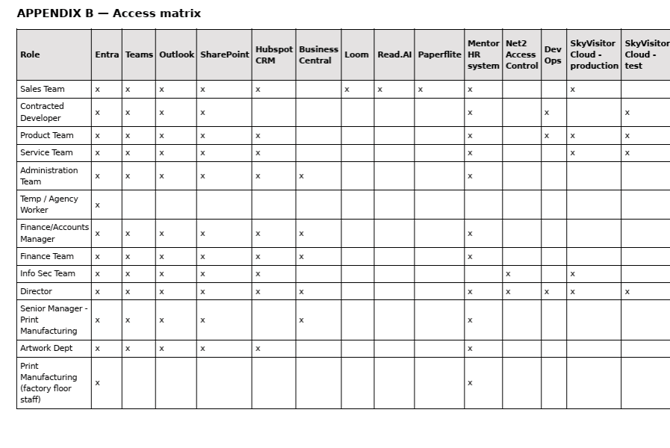
LAS - Company Director provisions access to all company-wide systems for all Software Team based staff, including M365 for email, intranet, Teams, and all O365 tools licensed under Business Professional; Hubspot for CRM; Loom for Video Recording and Read.ai for Meeting recording, scribing and and summaries. MS Business Central access is given only to users requiring access to the Operations and Finance side of the business. Azure Dev Ops is the development environment of use and access will only be given to Developers and Product Managers, as well as LAS - Director.
Requesting Additional Access Access Request:
Employees or managers submit requests for additional access through the Hubspot ticket portal - completing the appropriate request, including necessary details and justification. Approval Process: The request is reviewed and approved by LAS - Company Director.
Provisioning and Notification of Approved Access Provisioning:
LAS - Company Director provisions the approved access and responds on the HubSpot ticket. Notification: LAS - Co Director notifies the employee and (where relevant) their manager, of the granted access, including any conditions or limitations.
Access Review and Revocation Periodic Review:
IS team conduct periodic reviews to ensure access is still required and appropriate.
Revocation:
When an employee changes roles or leaves the company, Co Director revokes access, updating the HubSpot ticket accordingly.